

For independent and hyper-local publishers, original local journalism is their greatest asset. Since 2024, automated crawlers and artificial intelligence (AI) scrapers have exploded in volume. For lean newsrooms operating on shared hosting or modest VPS instances, AI bot traffic carries real consequences: server CPU spikes, bloated hosting bills, slow page-load times for human readers, and of course, the uncompensated scraping of local reporting.
And then, there’s the whole question of how Google Analytics see these different kinds of crawlers…
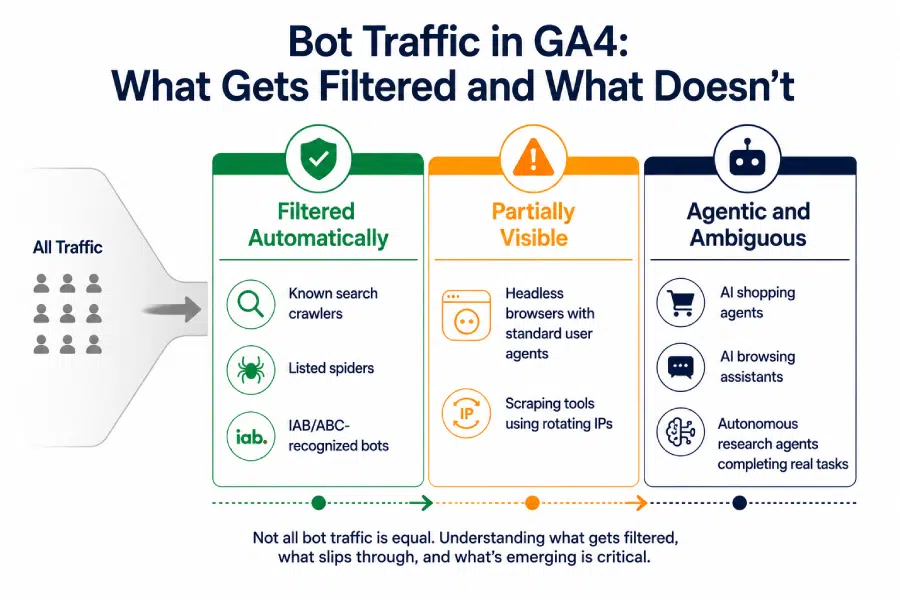
Managing this traffic requires understanding the crawler ecosystem, knowing which bots deliver audience value, implementing robots.txt directives, and strengthening network security.
The bot landscape: categorizing the “good,” the “bad,” and the “grey”
Not all bots are bad. Blocking every crawler blindly will cut off organic discovery, while allowing full access can cause your systems to become overwhelmed.
| Category | Primary Examples | What They Do | Publisher Value | Recommended Action |
| Traditional Search Indexers | Googlebot, Bingbot, DuckDuckBot | Discover and index web pages for traditional search engines. | Essential. Drives direct organic readership and ad impressions. | Allow. Do not block these across public content. |
| AI Search & Retrieval Bots (RAG) | OAI-SearchBot, PerplexityBot, Bingbot (search-mode) | Fetch pages in real time to cite sources and provide links within conversational answers. | Mixed / High. Can generate referral traffic and brand visibility when users click attribution links. | Allow or Selectively Allow. Monitor referral click-through rates. |
| User-Prompted Agents | ChatGPT-User, Claude-Web | Triggered directly by an individual user asking the AI to read a specific URL. | Neutral / Low. One-off reads; negligible impact on server capacity if un-spammed. | Allow. Generally harmless unless misconfigured into loops. |
| Bulk AI Model Training Crawlers | GPTBot, ClaudeBot, Meta-ExternalAgent, Amazonbot, Bytespider | Systematically vacuum up large archives to train or fine-tune offline LLMs. | None. Consumes significant bandwidth and CPU; returns zero referrals or ad views. | Block. Protect archives and save server overhead unless under a direct licensing deal. |
| Aggregator & Commercial Scraping Tools | CCBot (Common Crawl), headless browser frameworks (Scrapy, Puppeteer), turnkey scrapers | Harvests structured data for third-party datasets, resold APIs, or content theft. | Negative. Exposes content to low-quality syndication scrapers with zero attribution. | Block. Disallow in robots.txt and block at the edge firewall. |
2. Implementing robots.txt rules
A robots.txt file is the first line of defense. Reputable AI companies (OpenAI, Anthropic, Google, Meta) instruct their production crawlers to respect standard robots.txt directives.
Important distinction:
Google-Extendedcontrols Google’s AI training (Gemini, Vertex) without impacting your ranking in standard Google Search viaGooglebot.
Example A: The targeted protection model
This configuration keeps standard search and AI referral engines functioning while stopping major mass-scraping bots from training on your content:
# ==============================================================
# Allow Standard Search & Direct User Navigation
# ==============================================================
User-agent: Googlebot
Allow: /

User-agent: Bingbot
Allow: /

User-agent: OAI-SearchBot
Allow: /

# ==============================================================
# Block Bulk AI Training & Commercial Scraper Crawlers
# ==============================================================
User-agent: GPTBot
Disallow: /

User-agent: ClaudeBot
Disallow: /

User-agent: Anthropic-AI
Disallow: /

User-agent: Meta-ExternalAgent
Disallow: /

User-agent: Google-Extended
Disallow: /

User-agent: Bytespider
Disallow: /

User-agent: Amazonbot
Disallow: /

User-agent: CCBot
Disallow: /

User-agent: Diffbot
Disallow: /

User-agent: Scrapy
Disallow: /

# Default fallback for other polite bots
User-agent: *
Allow: /
It’s worth noting that this is not intended as a “set-and-forget” addition to your defences. The goalposts are moving constantly, and choosing to check this every 6 months in 2026 is the equivalent of a 5-year check in the past. Reviewing your AI and bot strategy quarterly is advised.
Example B: The strict defensive stance
If your priority is zero AI interaction outside of traditional Google (and Bing?) web search:
User-agent: Googlebot
Allow: /

User-agent: Bingbot
Allow: /

# Block all AI-driven agents explicitly
User-agent: GPTBot
Disallow: /

User-agent: ClaudeBot
Disallow: /

User-agent: PerplexityBot
Disallow: /

User-agent: Meta-ExternalAgent
Disallow: /

User-agent: Google-Extended
Disallow: /

User-agent: CCBot
Disallow: /

User-agent: *
Disallow: /wp-admin/
Disallow: /api/
Allow: /
What does “edge platform” mean?
For websites, an edge platform acts like a global network of digital photocopy shops. Instead of every single visitor in Melbourne or Perth waiting to fetch a website’s files from its host (the “origin server”) in Sydney or the US, the edge platform stores a copy of the website on hundreds of mini-servers spread across Australia and beyond.
When you click on a website using this technology, the edge platform automatically connects you to the server physically closest to your suburb. Here is how that changes things:
- Instant loading: Images, text, and code don’t have to travel across the continent, so the website pops up on your screen instantly.
- Crash protection: If millions suddenly visit the site at once (like during a major news event or a ticket sale), the traffic is split across hundreds of edge servers, preventing the main website from crashing.
- Local personalisation: The edge server can instantly tweak the website before it hits your screen—such as automatically showing you Australian dollars instead of US dollars, or adjusting content based on your local timezone.
- Cyber security: It acts as a digital bouncer. If hackers try to attack the website, the edge platform blocks the bad traffic locally before it ever reaches the main database.
The limits of robots.txt and why edge tools like Cloudflare are necessary
A robots.txt file tells bots what they should do, but it doesn’t prevent them from accessing your site. It is not a firewall. While it controls compliance-conscious operators, it fails against rogue scrapers, unverified crawler proxies, and malicious actors.
Edge platforms like Cloudflare act as a reverse proxy, intercepting incoming requests before they ever touch your web server. Deploying an edge layer offers several critical protections:
- One-click AI scraper blocking: Cloudflare includes a built-in toggle (Security > Bots > Block AI Scrapers and Crawlers) that maintains a dynamically updated registry of known scraping networks, blocking them globally.
- Behavioral fingerprinting: Advanced scrapers rotate user-agent strings or disguise themselves as regular desktop browsers (like Google Chrome on macOS).
- Zero origin load: When a bot is blocked or served a managed challenge (Turnstile) at the CDN edge, your server processes 0% of that request. This prevents CPU exhaustion, database locking, and sudden bandwidth surges.
- Rate limiting & endpoint isolation: Newsrooms often experience scrapers crawling sequential URL paths or hitting search query endpoints (
/?s=query). Edge rate-limiting rules restrict clients requesting more than 30–60 pages per minute, immediately mitigating mass scrapes. - Real-time visibility: Cloudflare’s Security & Bot Analytics dashboards break down requests by bot score, crawler identity, and request patterns, allowing technical leads to verify that authentic readers aren’t caught in the net.
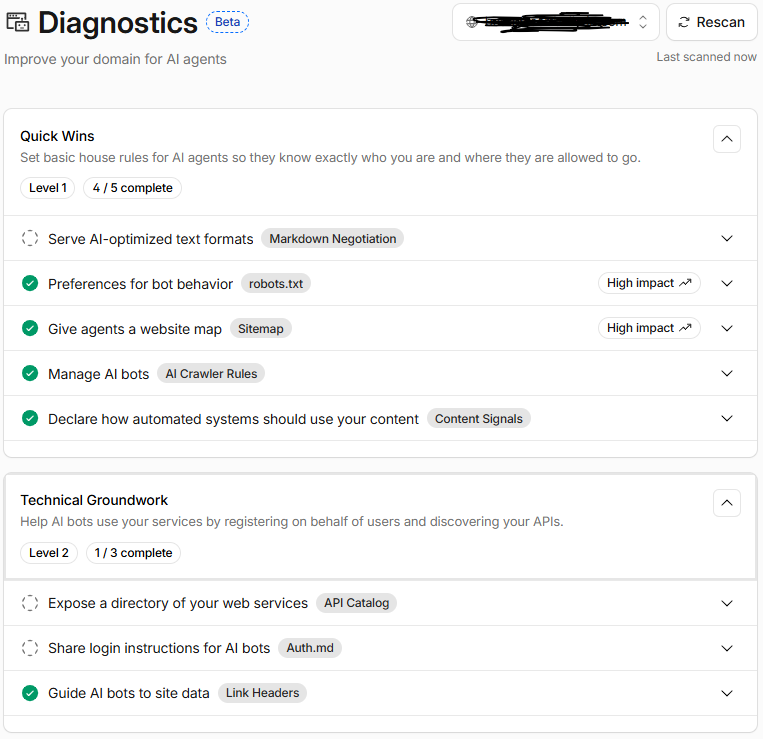
4. Operational monitoring checklist for publishers
To help keep your website running smoothly, regularly check and manage your web traffic:
- Audit web server access logs: Use command-line tools or log parsers (
awk,GoAccess, or your host’s raw access log exports) to scan for frequent user agents and aggressive IP blocks hitting/wp-json/, RSS feeds, or sitemaps.
If this sounds too hard, Cloudflare can do a lot of this heavy lifting for you, as can commercial tools such as Tollbit and ScalePost. - Monitor upstream analytics vs. ad impressions: A large surge in raw HTTP requests without a corresponding rise in Google Analytics pageviews or ad programmatic auctions almost always points to headless automated scrapers.
- Protect feeds and archives: Bulk crawlers commonly parse
/feed/,/rss/, or older archive directories to map sites. Consider setting stricter edge caching and rate limits specifically on RSS endpoints. - Review publisher-specific AI initiatives: Re-evaluate your crawler policy quarterly. As AI engines refine attribution and licensing ecosystems develop, your association may decide to treat live citation bots (
OAI-SearchBot,PerplexityBot) differently than generic mass scrapers.
Not sure on what any of these things mean and need a hand?
Book in a meeting with Adrian who can help you set up your AI protection policies.
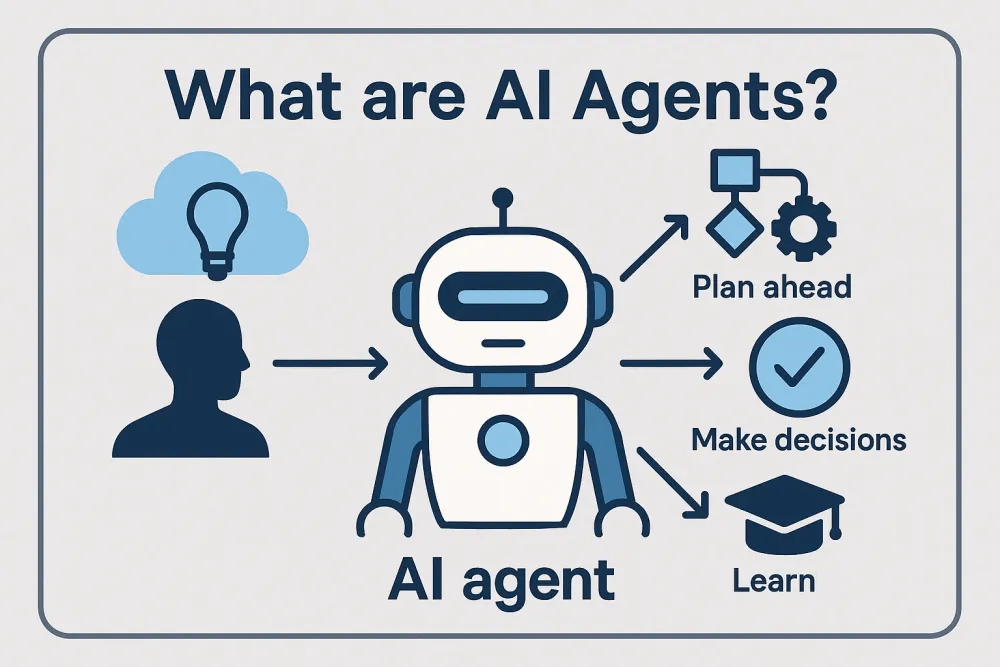
The next frontier: Autonomous AI agents vs. bots (or “standard crawlers”)
Standard web crawlers function like automated delivery vans: they follow fixed routes, stick to predetermined paths (like sitemaps and links), carry distinctive identifiers (their declared User-Agent strings), and check the property gates (robots.txt) before entering.
AI Agents operate on an entirely different paradigm.
Instead of following a fixed set of instructions, an AI agent can adapt and make decisions as it goes (often using architectures like ReAct or tool-calling frameworks). It can visually parse your site’s Document Object Model (DOM), interpret context, execute multi-step plans, click interactive buttons, search databases, and adapt if your layout changes. In other words, it can understand what’s happening on a website and work out what to do next, rather than simply following a fixed set of instructions. If an agent encounters a modal or a tabbed element, it doesn’t fail—it simply decides to click the “Close” button or toggle the tab to reach the text underneath.
For independent and hyperlocal publishers, dealing with agentic traffic requires recognizing that not all agents are built alike. They fall into two fundamentally different operational models: human-directed agents and machine-directed agents.
1. Human-directed agents: The “zero-click reader”
- How they operate: A single local user may give an AI assistant an explicit prompt—e.g., “Summarize the Women’s Circus article reported in the Westsider,” or “Find out what the mayor said about the new airport on westernweekender.com.au.” Browser-based agents (such as Claude Computer Use, ChatGPT Operator, or integrated browser assistants like Copilot and Apple Intelligence) will visit your site on behalf of that specific person – and gather the data requested in the prompt.
- The footprint: Highly surgical and low-volume. They navigate 1 to 5 pages, locate the relevant reporting, take the facts, and then close the session.
- The publisher dilemma: This represents an authentic user seeking local news. However, the agent removes the site’s design and content layout, showing its answer directly in a third-party chat instead. The newsroom still pays the cost of hosting the content, but gets no ad views, sponsored content views or newsletter sign-ups in return.
- Defense & policy: Don’t treat these as typical attacks. Instead, protect your business model with server-side controls:
- Eliminate client-side paywalls: Agents easily bypass soft paywalls that merely obscure text using CSS (
display: none;) or translucent JavaScript overlays. Harder paywall products such as Piano and Zephr are more effective. These gate subscriber-only content at the server level so the raw text is never rendered to unauthenticated browsers or proxy agents. - Differentiate Headers: Mainstream providers often distinguish human-driven requests with specific user-agent tokens (e.g.,
ChatGPT-User,Claude-Web). Review these separately from bulk training scrapers so you don’t inadvertently ban an accessibility or assistive reading tool used by a paying subscriber.
- Eliminate client-side paywalls: Agents easily bypass soft paywalls that merely obscure text using CSS (
2. Machine-directed agents: The “industrial harvesters”
- How they operate: These are automated processes that run on a schedule without human involvement, coordinated by systems that manage multiple AI agents (such as CrewAI, LangChain, AutoGen, or tools like Crawl4AI and Firecrawl), they are deployed by commercial aggregators, data brokers, or competitor apps. A typical prompt running on an automated time-scheduled loop might be: “Check every local news site across the county every 30 minutes for zoning notices, summarize them into real-estate leads, and populate our paid dashboard.”
- The footprint: High-frequency, wide, and persistent. They hit internal search bars, parse RSS feeds, traverse pagination, and execute client-side JavaScript to systematically harvest structured data.
- The publisher threat: This is the deliberate, large-scale use of local news content without permission. These agents run automated browsers across multiple cloud servers, which can quickly overwhelm smaller website hosting systems. This increases hosting costs and slows the website down for real (human) readers.
Comparing the three classes of automated visitors
| Dimension | Standard crawlers (e.g., GPTBot, CCBot) | Human-directed agents (e.g., ChatGPT-User, browser tools) | Machine-directed agents (e.g., autonomous frameworks) |
| Origin / Motivation | Bulk indexers ingesting corpora for offline model training. | Individual reader using an on-demand AI assistant for a specific lookup. | Programmatic scripts harvesting reporting into commercial databases or feeds. |
| Session Pattern | Predictable, linear page downloads; sitemaps and raw HTML. | Surgical; visits 1–5 specific URLs, extracts data, and exits. | Recursive; queries internal search bars, clicks interactive elements, sweeps archives. |
Respect for robots.txt | Yes (reputable vendors adhere strictly). | Varies (often defaults to the user’s browser permissions). | Rarely (custom scraping agents ignore advisory files by design). |
| Origin Impact | High bandwidth from high-volume raw HTML pulls. | Low compute footprint; short individual sessions. | High CPU/RAM load from running full browser rendering engines against the site. |
| Recommended Action | Manage via robots.txt rules and basic WAF blocks. | Permit conditionally behind server-side paywalls and logins. | Enforce hard edge barriers: WAF behavioral rules, ASN blocks, and managed challenges. |
Defending the newsroom against agentic traffic
Because autonomous and masked agents often ignore robots.txt and disguise themselves as human visitors, independent publishers need extra security measures to identify and block suspicious traffic before it reaches their websites::
- Gate unverified data-center traffic: The vast majority of machine-directed agents run from cloud hosting platforms (AWS, DigitalOcean, Hetzner, OVH) rather than standard residential ISPs. Configure your edge firewall (via Cloudflare or your CDN) to trigger a silent Managed Challenge (such as Cloudflare Turnstile) on requests originating from non-verified hosting ASNs attempting to access archive or search directories.
- Rate-limit dynamic site endpoints: AI agents often search websites repeatedly to find information. Set limits on how often internal search can be used (
/?s=,/search/) and dynamic listing paths—limiting single IPs to no more than 5–10 search queries per minute. - Hard-gate REST APIs: Content management systems like WordPress publish complete post contents via public endpoints by default (e.g.,
/wp-json/wp/v2/posts). Agents frequently query these APIs directly to bypass theme rendering. Restrict public REST API access to authenticated users or throttle these endpoints aggressively at the CDN level. - Deploy trap links (Honeytokens): Inject links within article templates styled with hidden CSS properties (
display: none;oropacity: 0; pointer-events: none;) that lead to an administrative trap URL disallowed inrobots.txt. A human reader will never encounter or click this link, but an agentic scraper scanning DOM anchor nodes will follow it. Any IP hitting this trap can be automatically blocked across your association’s network for 48 hours.
Note – I used Google’s Gemini to assist with the research, image generation and first-round sub-editing of this article.