
A practical guide to creating and improving newsletters that help newsrooms reach more readers and strengthen audience relationships. Learn how to choose the right platform, grow sign-ups and open rates, engage readers more effectively, and explore ways to monetise your work.
Newsletters have become one of the most effective ways for newsrooms to distribute their journalism directly, deepen relationships with readers and drive engagement. This Kit draws on international best practice and the experiences of LINA members to show how you can make the most of that opportunity. It focuses on clear, workable ideas that teams or individuals can apply quickly and build on over time.
Newsletters work best when treated as editorial products in their own right, not just as marketing tools. A clear purpose and consistent tone help build loyalty and recognition over time. When done well, they deliver strong value for the effort, supporting both audience growth and monetisation. The examples throughout show that each newsroom approaches its newsletter differently, yet all share a common aim to connect with readers and build trust.
The Newsletter Growth Kit is for anyone who wants to strengthen their newsletters, from independent journalists to established newsrooms. The Kit is flexible, regularly updated and designed to stay practical as the tools and landscape evolve.
Feedback is welcome, and support is available as LINA’s team helps you develop your newsletter and deepen your connection with your audience.
Note: AI was used for researching and summarising resources included in this guide.
Table of Contents
Chapter One
The return of the newsletter

After years of publishers relying heavily on social media, newsletters have re-emerged as one of the most reliable ways to reach audiences directly. As algorithms and platform rules shift, newsletters offer stability, build loyal habits, strengthen relationships, and reduce dependence on third-party platforms.
A direct line to your audience
If getting your journalism in front of your audience isn’t your top priority, you might be in the wrong business. Newsletters are one of the few ways to do that reliably. They land in inboxes of people who have chosen to hear from you, not at the mercy of a social platform or search algorithm. For newsroom publishers, that kind of access is rare and valuable.
Among LINA members, approaches to newsletters vary. Some have built strong newsletter-first strategies that anchor audience growth. Others send one mainly to support print or online work, and a few aren’t yet in the newsletter space at all because of time or uncertainty about where to start.
It won’t always be this easy. As Google and Apple segment inboxes into priority and promotional tabs, visibility may become harder over time. An article by the International News Media Association (INMA) notes that these changes could make it harder for newsletters to reach readers consistently. You’ll find practical tips for improving inbox visibility under Getting into the primary inbox in Chapter Four. Even so, newsletters still offer a direct, dependable path to your readers, providing measurable results for advertisers and valuable insights for editorial teams.
“Your database is an asset you own, it has value to your business, and it’s something that you can grow and is not impacted by algorithms or social media or anything else, and it’s the most powerful gun you have in your weaponry. So, using it well, using it wisely is the most valuable work you can do.”
Ella Walsh, Pinstripe Media
Producing a good newsletter takes time, but it’s time well spent. Regular sends keep your journalism in front of people, build habit and loyalty, and bring audiences back to your work. For small or local publishers, newsletters deliver strong returns because they’re affordable to run, build personal connection, and don’t rely on outside platforms.
“The danger with Facebook is if they decide to pull the plug on me, I’m screwed… I need to build my own networks that I control.”
Susanna Freymark, IndyNR
The best newsletters are treated as editorial products with clear goals and audiences. When you know what yours is for, whether it’s building habit, growing reach, generating revenue or deepening relationships, it delivers more impact. Whatever place it holds in your publishing model, approach it with the same intent and care as any other part of your journalism.
“Our newsletters average over 60% open rates. That’s because we aim to make them valuable in themselves, not just promotional.”
Annabelle Hickson, Galah
Building on someone else’s land
When Meta deprioritised news content, it exposed the risk of building an audience on third-party platforms. The News Media Bargaining Code, introduced in 2021, aimed to return some lost ad revenue to newsrooms. But when Facebook briefly removed Australian news during those negotiations, it showed how fragile that access could be.
Since then, Meta has removed its news tab on Facebook and blocked access to news sites in Canada altogether. These actions were a wake-up call for publishers to diversify how they reach audiences. Smaller publishers, who rely heavily on social media to build awareness, were hit hardest.
Whether you’re distributing news on social media, video platforms or aggregator sites, your connection with followers can change overnight. That’s why it’s important to maintain direct relationships with your audience and full control of the data behind your lists and analytics.
Chapter Two
Simple steps you can take today

Small improvements can make a big difference to how readers open, read and respond to your newsletter. These are simple changes you can apply straight away, without new tools or extra budget.
Send at a consistent time
Consistency builds habit. Pick a day and time that suits your audience and resources, then stick with it.
“I’m old school, I decided to do it on a very regular basis. So I publish every Sunday at 7 pm. Because I think it needs to be regular, so people know to expect it.”
Greg Day, TWiSK
Subject lines that work
A good subject line is your first chance to get your newsletter opened. It needs to stand out in a crowded inbox and give people a reason to click.
Keep it short and clear. Curiosity works if the content delivers on what it promises. A playful or slightly click-driven line can attract attention, but misleading readers will only hurt trust. Personal or local references often perform well, as do short, active phrases that sound like something you’d actually say. Emojis can help your subject line pop, but use them sparingly and only when they fit your tone.
Try a simple level of personalisation in your subject line, such as adding the reader’s first name. Most email platforms use merge tags to insert subscriber details automatically. Check your platform’s help guide for the correct format, and always send yourself a test before publishing to confirm the personalisation displays correctly.
If your platform allows, run simple A/B tests to compare two subject lines and see what readers respond to. Small experiments like that can make a noticeable difference over time.
“Subject lines are a real art… Having more than one set of eyes on it… the art of writing microcopy… it’s got to be hooky… I don’t want to say clickbait, but it’s got to be close. But… what you’re promising has to be in the newsletter… your inbox is probably the noisiest place… getting people to open is almost all the work.”
Ella Walsh, Pinstripe Media
Write useful preview text
Most inboxes show a short line of text next to the subject line, called the preview text or preheader. Most platforms let you set this text separately, but if you leave it blank, many email clients will display the first line or two of your email body instead. It’s valuable space that helps convince readers to open your email.
Avoid filler like “Dear [Name]” or “Having trouble viewing this email?”. Instead, write something that adds context or curiosity, a second headline that complements the subject line and encourages the open.
“The preview text is often that wasted bit that people don’t use underneath. And it’s just another chance to sell what you’ve got in that newsletter.”
Ashlynne McGhee, The Conversation
Add a personal note at the top
A short personal line or introduction helps readers connect with you as a person, not just a publication. It can make your newsletter feel warmer and more distinctive.
You don’t need to share much. Explain why this issue matters, or add a small human touch that helps readers feel part of something real. For more about developing a consistent and human tone, see Tone and voice in Chapter Five.
“[When asked about recent improvements] Probably the introduction of the introduction — that’s not that recent now, probably two years ago — but it was about trying to make it a bit more personal and build that relationship with the readers.”
Kim Treasure, Region
Make it easy to scan
Readers often skim before deciding what to read in detail. Keep your layout clean and easy to follow.
Use short paragraphs, subheadings and bullet points. Keep sentences direct and avoid unnecessary intros. Limit each issue to a few key stories so it feels focused, not overwhelming.
“My longest story is probably 400 words. If it’s a really detailed community thing it might be 1,200, but I wouldn’t think more than 20 or 30 people would read that. So you need to cover the bases, but keep it short where you can.”
Greg Day, TWiSK
Design for mobile
Most readers open newsletters on their phone, so design should start with mobile in mind. A layout that looks fine on one device can break on another, especially in dark mode or on smaller screens.
Keep your design simple. Use a single column, clear buttons, and enough spacing for easy tapping. Aim for body text around 16 pixels to keep it easy to read on all devices. Avoid heavy images or elements that only suit desktop width.
Gmail may clip long emails if the HTML code exceeds about 102 KB, hiding the rest behind a “Message clipped” link. This can affect how your newsletter displays and which parts readers see. Keeping templates lean and testing for size helps avoid this.
Before you send, preview your newsletter on your phone and desktop, and if possible, send a test email to a few others to check how it looks across devices, browsers, screen sizes and colour settings. Many platforms include this feature, and external tools such as Litmus can also help you test across multiple environments.
“About 80 per cent of site traffic’s on mobile, so we keep that in mind.”
Darryl Olson, Sunshine Coast News
Use a simple template
Simple layouts are faster to build, easier to maintain and less likely to break on different devices or in dark mode. Prioritise clarity over decoration. For more about building layouts that save time and stay consistent, see Low-effort design templates in Chapter Three.
“Content over design wins.”
Annabelle Hickson, Galah
Send a welcome email after sign-up
A short welcome helps new subscribers know what to expect and how to keep your emails visible. Include a friendly hello, your sending cadence, and one or two links that show your best work. For more about what to include and examples, see Welcome emails in Chapter Four.
“On Substack we only get one welcome email, but on Beehiiv I can build automations.”
Miko Santos, Mencari
Keep your list clean
Remove chronically inactive subscribers and fix bounces. This helps deliverability, protects your sender reputation and improves your metrics. You can also set up simple rules or automations to flag subscribers who haven’t opened or clicked for a set period, or automatically suppress bounced addresses. This keeps your list healthy on an ongoing basis instead of relying on a yearly clean. See List health and segmentation in Chapter Four for more on managing your list and improving deliverability over time.
“It’s usually like a once a year job… we’ll do a big list clean and sort of get rid of like ghosts and zombies.”
Louise Cornegé, The Conversation
Pay attention to your analytics
Your open and click rates won’t tell the whole story, but they’ll point you in the right direction. Check them over a few editions, see what people respond to, and adjust things like headlines or timing as you go. For more about interpreting performance trends and applying insights, see Reading your data in Chapter Seven.
“We track open rates, click rates, sign-ups, unsubscribes so you can spot trends and see where things might be making a difference.”
Louise Cornegé, The Conversation
Chapter Three
Making it sustainable

Small changes can spark improvement, but real progress comes from consistency. A newsletter only works if it can keep going. The most effective publishers treat it as part of their weekly rhythm, not an extra task squeezed in at the end. Sustainability means designing a workflow your team can maintain. It should work during both quiet weeks and busy ones.
Workflows that fit small teams
Many LINA members publish with small or part-time teams. Their systems are simple but deliberate: one person drafts, another reviews, and a shared checklist or calendar keeps everyone on track. What matters most is repeatability. A workflow that runs smoothly at your current size will still work as your newsroom grows.
“We’re quite structured in our content planning. We use Monday.com… Every piece of content has an item in Monday.com. It’s planned as a date.”
Rebecca Guest, The Fold
“The editorial team’s workflow is really built around that daily newsletter.”
Louise Cornegé, The Conversation
Assigning roles
Define who is responsible for each stage: writing, checking links, proofreading, sending, and tracking results. In small teams, one person may hold more than one of these roles, but there should always be clarity about who signs off each edition. That clarity prevents errors and helps maintain tone and consistency.
“We have a newsletter editor who puts together a general news roundup, a what’s on guide, and a section called In the Flock.”
Annabelle Hickson, Galah
Low-effort design templates
A sustainable newsletter isn’t redesigned every week. Build a simple, readable template and reuse it. Many rely on saved blocks for regular sections such as top stories, community updates, or events. This not only saves time but helps readers recognise familiar patterns. Accessibility and readability in both light and dark modes should guide your design choices.
“Our journalists populate the template — it takes a few minutes, they add story links, adjust headlines, and schedule it to go out at 11 am daily.”
Darryl Olson, Sunshine Coast News
Design with accessibility in mind so your newsletter works well for all readers, including those using screen readers or high-contrast settings. Use clear headings, strong colour contrast, descriptive link text, and alt text for images. The Web Content Accessibility Guidelines (WCAG) provide useful principles and examples.
Think carefully about typography and whitespace. Use consistent, readable fonts, ideally just one or two throughout your newsletter. Avoid decorative styles or unnecessary font changes. Ample white space helps readers scan, especially on mobile or across email clients.
“Changed the layout considerably… quite visual with a lot more kind of graphics with text overlay rather than a lot of copy… we’re going to give that a trial for a couple of months.”
Rebecca Guest, The Fold
Images and photos
Photos and graphics can make a newsletter more engaging and help communicate your tone and brand. Use them carefully so they support your stories rather than slow them down or create legal risks.
“We’ve customised a fair bit… I just wanted to make it look nice, and the visual stuff’s really important for Galah, but not too much work.”
Annabelle Hickson, Galah
Keep file sizes small so emails load quickly, especially on mobile. A width of around 600 pixels usually works well for full-width images. Use JPGs for photographs and PNGs for logos or graphics that need clear edges or transparency. Limit the number of large images in each issue to avoid long load times and the risk of triggering spam filters.
Always include alt text or captions so readers understand the image even if it does not display. This supports accessibility and improves clarity for readers using screen readers or text-only views.
Check that you have the right to use every image. This may come from your own newsroom’s photographers, a wire service, a stock library, or a Creative Commons licence that allows reuse. Keep a record of permissions or licences for each image.
Take particular care when photos include identifiable people or private locations. If an image could be used in a promotional or fundraising context rather than pure reporting, you may need written consent or a model release from those shown. For children or vulnerable people, obtain consent from a parent or guardian.
Choose images that fit your publication’s style and purpose. Consistent framing, tone and colour help readers recognise your brand and build trust in its professionalism.
Choosing the right platform
The best platform is one that suits your team and keeps things simple. Before choosing, take a moment to identify what you need from your email platform. You might want to send a welcome series for new subscribers, create audience segments for targeted content, offer flexible unsubscribe and preference options, or simply cover the basics. Most tools can deliver newsletters reliably, but they differ in cost, design options, ease of use and monetisation features.
The platforms listed below are commonly used by publishers, but they are not recommendations or a complete list. If you use another platform that works well for your newsroom, let us know as it may help other publishers too. Choose the tool that fits your needs and budget.
Frequency and consistency
Decide how often you can realistically send. Weekly, fortnightly, or monthly can all work. What matters is reliability. Regular sends build habit among readers and discipline among staff. Several LINA members said that once they set a schedule and stuck to it, production became easier and audience engagement improved. If capacity drops, it is better to scale back than to disappear for a while
See also Chapter Five: Keeping readers engaged, which covers building reader habits once you’ve set your rhythm.
“In Southern Highlands, it’s weekly, Illawarra, it’s monthly… it’s based on resources.”
Rebecca Guest, The Fold
“We usually send weekly, but breaking news goes out immediately in real time to subscribers.”
Miko Santos, Mencari
“We’ve got four rotating newsletters within a monthly cycle… a letter from me, the editor, a gardening one called In the Weeds, a cooking one called Yes Chef, and We Bought a Hotel…”
Annabelle Hickson, Galah
“The regular publication is valuable because people then get to know your timelines. They call me months in advance to ask when they should send me their copy.
Greg Day, TWiSK
“People are reading news either laying in bed or while having their coffee in the morning… if we want to be in their diet, then we’ve got to send our newsletter to be there then.”
Ashlynne McGhee, The Conversation
Staying compliant
Always make it clear how people join and leave your list. Under the Australian Spam Act, subscribers must give consent, and every email must identify your organisation and include a working unsubscribe link. The Privacy Act also covers how personal information is collected and stored. For most small publishers using off-the-shelf platforms such as Mailchimp, Ghost, or Substack, these basics are built in, but it is still important to understand your responsibilities.
“We’re very clear about making it easy to unsubscribe, we won’t sell on details, it’s very much about being open and upfront with our audience.”
Kim Treasure, Region
Compliance is part of building trust with your audience. Use clear sign-up forms, avoid pre-ticked boxes, and make sure every unsubscribe request is actioned quickly (within five working days, as required by law).
Consider using a double opt-in process, where new subscribers confirm their sign-up by clicking a link in a follow-up email. It’s not required under Australian law but is widely encouraged as best practice. Double opt-in helps prevent spam complaints, keeps your list accurate, and improves deliverability.
If you publish multiple newsletters, let readers choose which ones they want rather than adding them automatically. Review your privacy statement occasionally to ensure it reflects what you actually do. LINA provides a Privacy Policy template to help newsrooms meet these obligations.
Know the rules
Australia’s main laws are the Spam Act 2003 and the Privacy Act 1988. These cover consent, identification, data use, and unsubscribe requirements. The rules are less strict than the European Union’s General Data Protection Regulation (GDPR), introduced in 2018, which requires explicit consent and gives people broad rights to access or erase their data. Other regions have their own versions, like Canada’s Anti-Spam Legislation and the US CAN-SPAM Act, but these focus mainly on email compliance rather than broader data rights.
Australia is now reviewing and updating its privacy framework, with further reforms expected to strengthen consent rules and extend coverage to more organisations. Publishers who already follow clear opt-in practices and handle data transparently will be well prepared.
Chapter Four
Growing your audience
A well-crafted newsletter is only valuable if people receive it. After focusing on content and compliance in the previous chapter, the next step is to help it reach more of the right readers. Growth is not about chasing the biggest list but building a strong, relevant audience that opens, reads, and shares your work.
“The main frustration now is growth plateauing. We’ve built something great, now we need to focus on audience growth.”
Annabelle Hickson, Galah
Sign-up forms and landing pages
Make it easy for people to subscribe, and make the reason clear. Every page should include a visible and simple sign-up option. Avoid small links or cluttered pop-ups. A short line about what readers will get and how often you send it is often enough.
Dedicated landing pages can work better than footers because they focus attention and explain your value. Include an example issue or a few headlines so potential subscribers can see what to expect. Giving people a clear sense of content helps increase sign-ups and reduce and reduce opt-outs or bounced emails later on.
The Conversation really wants you to subscribe
The Conversation makes newsletter sign-ups impossible to miss. Its website highlights subscription options in multiple places and uses the size of its existing audience as social proof. Visitors see calls to subscribe at almost every scroll point.



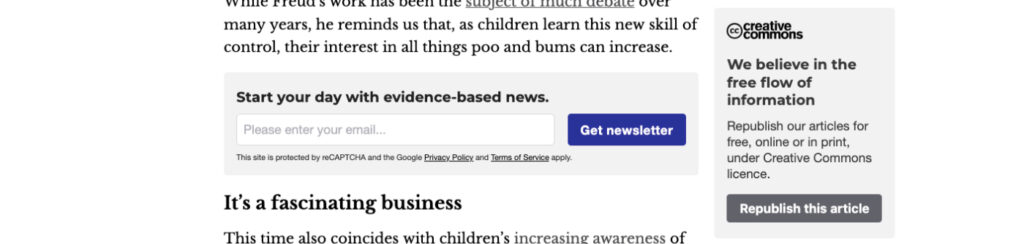
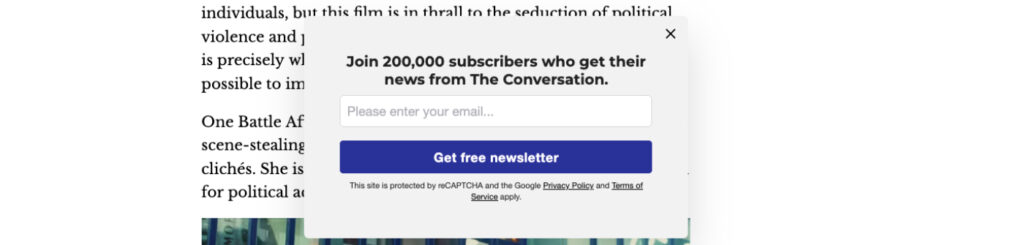
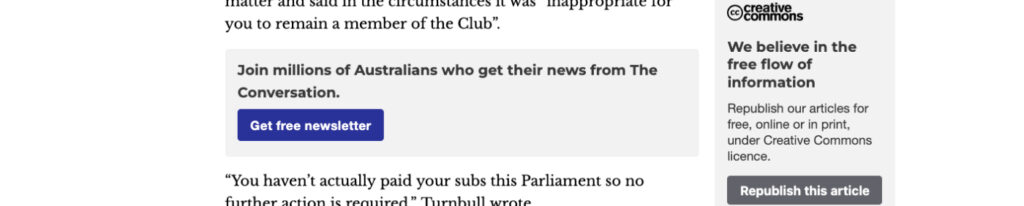
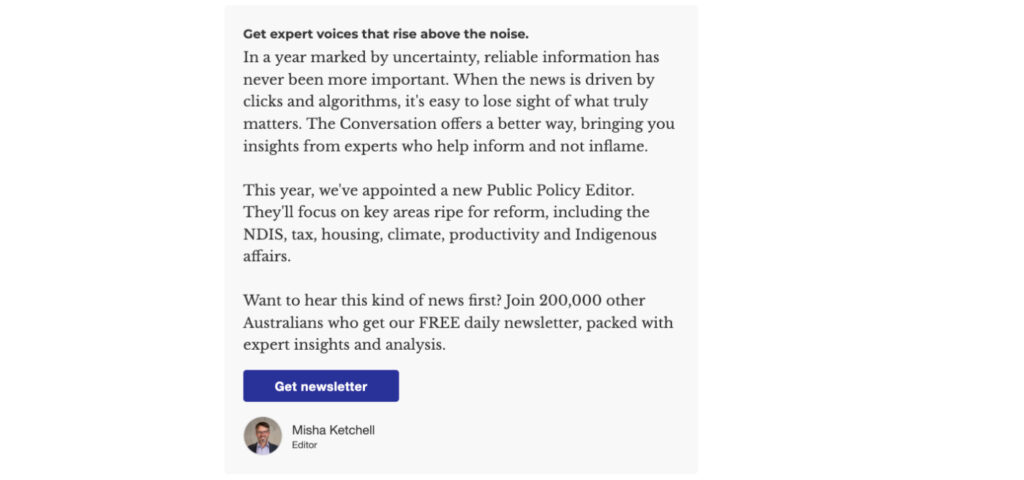

The result is a consistent reminder that the newsletter is central to The Conversation’s relationship with readers.
Welcome emails
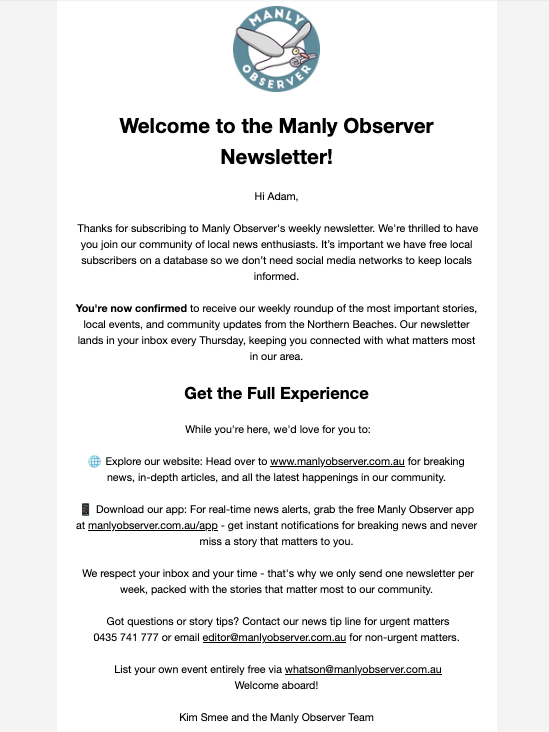
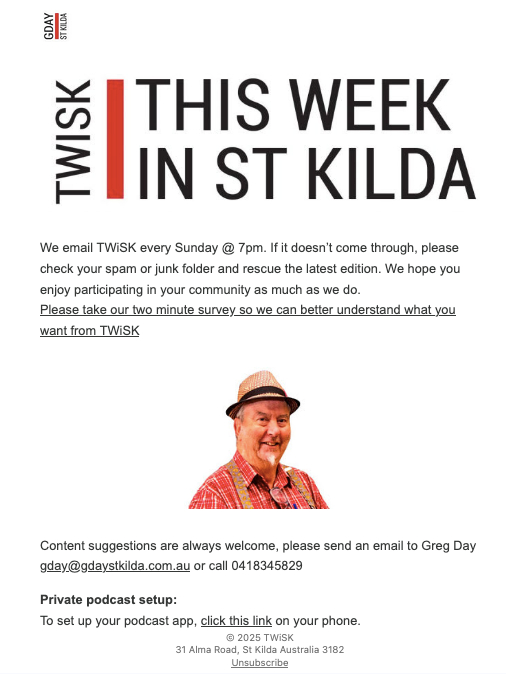
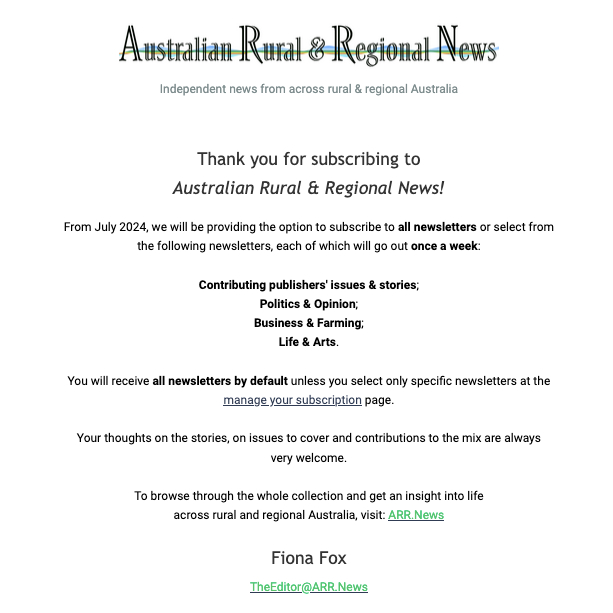
A welcome email should be sent automatically when someone joins. Most platforms let you set this up as an automation so it goes out straight away, without you needing to send it manually. Use it to introduce your publication, share a few key stories, and set expectations for frequency and tone.
Some publishers go further with an automated welcome journey, a short series of triggered emails spaced over several days. For example, the first might send immediately, the second a few days later, and the third soon after that. The first thanks the reader for joining, the next shares your most popular or representative content from the past few weeks or months, and another explains your mission or invites feedback. This early contact helps new readers understand your voice, builds trust, and reduces unsubscribes later on.
Some also include links to explore your website, download your app, or connect through other channels. Others invite readers to take part by sending story ideas or completing a short survey.
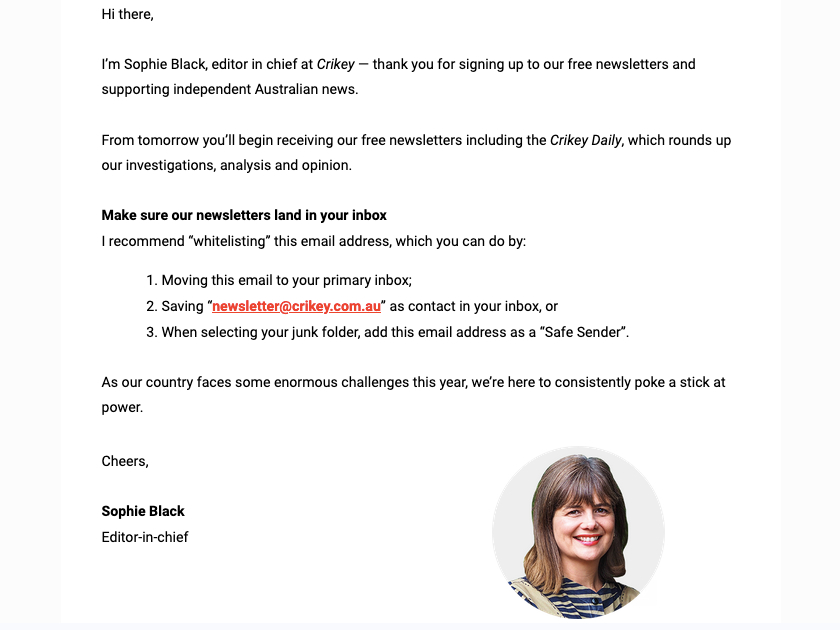
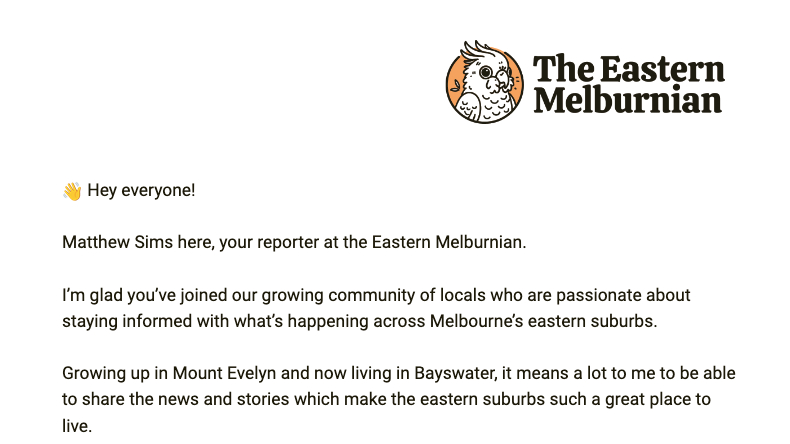
Welcome email examples
A short, personal note from the editor helps new readers feel welcome and connected from the start.
Getting into the primary inbox
Several publishers also use their welcome email to help readers make sure future newsletters reach their inbox. This can be as simple as suggesting they reply to the first email or add the sender to their contacts. Some include quick steps for Gmail and Apple Mail users, such as moving the email to the Primary tab or adding it to VIPs. These small prompts take seconds for the reader but can make a big difference in deliverability and open rates.
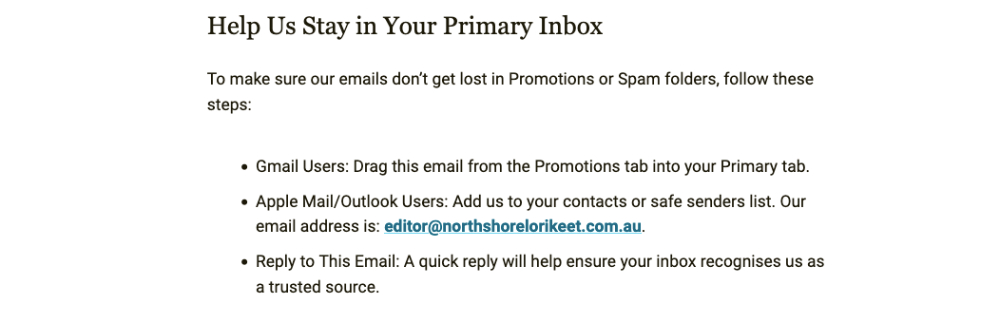
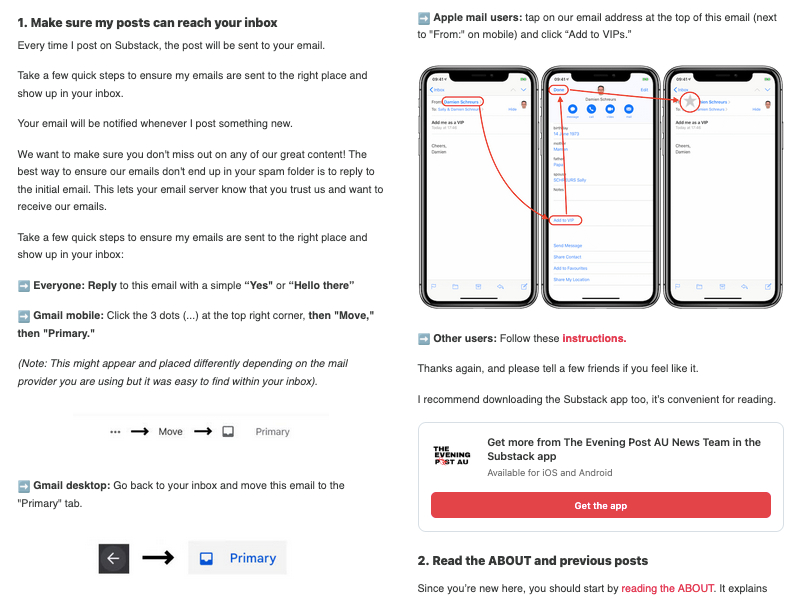
If your newsletter often goes to workplaces, schools, councils or other organisations, you can also suggest that readers ask their IT team to whitelist your sending domain. Business and government networks sometimes use stricter spam filters or security gateways that can block or divert bulk emails. Strong technical settings also support deliverability and reduce the risk of messages being flagged as spam. See the Technical Checks section in Chapter Seven.
Website embeds, social plugs, print mentions, cross-promotion
Use every channel you already have. Add sign-up boxes on your homepage, article pages, and contact forms. Mention the newsletter in your print edition, radio programs, or podcasts. On social media, share posts that invite followers to subscribe, not just to click on stories.
“Every time Ash’s team does a set of tiles on Instagram, they’ll have one at the end that’s, like, sign up to our newsletter… Anytime there’s any sort of touch point with our audience, that’s what we’re pushing. Newsletters, newsletters, newsletters, sign up, sign up, sign up… then we can talk to them about becoming a donor.”
Louise Cornegé, The Conversation
Competitions, surveys and interactive content such as quizzes can also help attract new readers. These work best when the sign-up option is clear and optional rather than automatic.
“We also run a weekly quiz that’s quite popular. At the end of the quiz there’s an opportunity to sign up. So we just kind of keep presenting it to people as many times as we can.”
Kim Treasure, Region
Cross-promotion works well among trusted publishers. Sharing a short note about another local or topic-aligned newsletter can help both of you reach new, engaged readers. Some platforms, such as Substack, include built-in recommendation tools that make it easy to promote each other’s newsletters to compatible audiences.
Beyond your own channels, look for online spaces where your audience already gathers. Reddit can be a useful discovery space, especially for local or issue-based publishers, but only if you play by the rules. Many subreddits discourage or ban self-promotion, so it’s better to start by participating in discussions, asking questions, and contributing to community threads. Once you’ve built trust, you can occasionally share your own stories in context, such as inviting feedback or discussion on a local issue. Some publishers also use Reddit Pro tools to identify relevant communities, share articles via RSS, and track how posts perform.
Word of mouth and referrals
The most reliable way to grow is often the simplest: readers telling other readers. Add small prompts like “Forward to a friend” or “Share this link to sign up.” Encourage contributors, partners, and staff to share your newsletter within their own circles.
Referral tools can help, but personal recommendations are usually more effective. People subscribe when they hear genuine enthusiasm from someone they trust.
How LINA members get readers to sign up
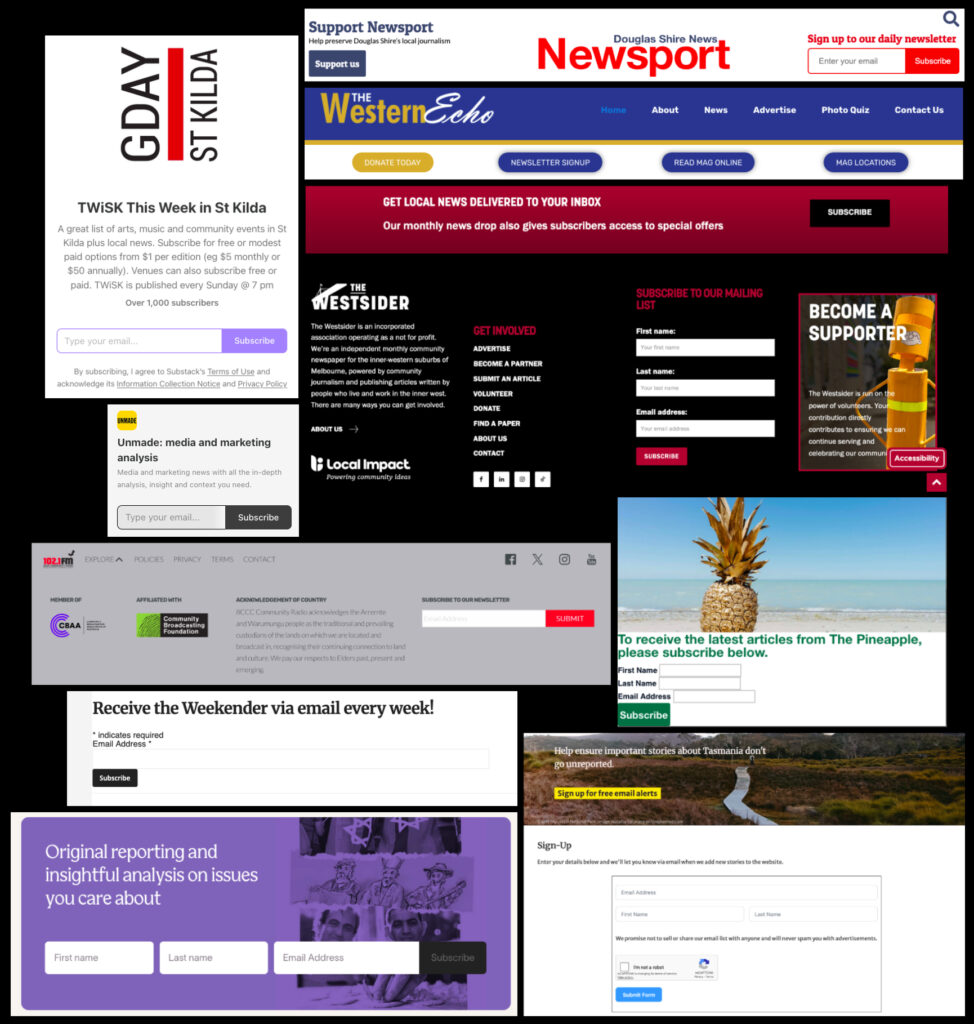
Different approaches work for different publishers. The Conversation places sign-up options across its site, matched to topic areas. Sunshine Coast News puts its newsletter link at the top of the homepage and on every story. Australian Rural & Regional News uses a simple one-click form to reduce barriers to entry.
Most publishers find that clear, visible sign-up options work best. Place a form near the top of your homepage, add one at the end of stories where readers are already engaged, and include a link on your About or Contact pages. A short pop-up or slide-in that appears after a reader has spent some time on the site can also be effective. Keep it quick and easy to subscribe without disrupting the reading experience.
Start with one clear, easy-to-find form, then review what drives the most sign-ups and refine your layout and messaging over time.
Other ways to grow sign-ups
Email collection does not have to happen only online. Some publishers collect sign-ups at community events, while others use QR codes on posters or merchandise to make subscribing quick and easy on a phone. Tablets or laptops can also be used, but each person must complete the opt-in form themselves.
“When we do events, we hand out postcards with QR codes. Or we’ll have it on the screen.”
Louise Cornegé, The Conversation
Under the Spam Act 2003, you need express consent before adding anyone to your list. A short collection notice should explain why you are collecting the address, how it will be used, and include a link or reference to your privacy policy. The person must actively agree to receive emails, and you should keep a record of that consent.
If you also publish a print edition, use QR codes to connect print readers with your newsletter. Place a code where readers naturally pause, such as on the cover, beside a feature story or in a margin. Add a short prompt like “Scan to subscribe” or “Join our email list” and link it to a simple, mobile-friendly form. Test the code at print size to make sure it scans easily and track how many people sign up through it.
However you collect emails, be transparent about what people are signing up for and make it easy to unsubscribe at any time.
List health and segmentation
Keeping your list clean isn’t just about tidiness. It affects how reliably your newsletters reach inboxes, how much you pay your platform provider, and how relevant your content feels to readers.
A healthy list matters more than a large one. Review your list regularly to spot readers with no opens or clicks, try a re-engagement journey with them, and if they remain inactive, consider removing them. This keeps your deliverability strong and your data meaningful. Many email platforms let you automate parts of this process by flagging or suppressing inactive subscribers and bounced addresses.
“I prefer to just have a smaller, higher open rate… and maintain open rates.”
Rebecca Guest, The Fold
Before removing inactive subscribers, consider sending a short re-engagement email to people who haven’t opened in a while, such as six months. It might include a few of your most popular articles from the past month as a reminder of what they’re missing and an easy option to stay subscribed.
Gmail’s subscription-management feature helps users declutter their inboxes and may prompt them to unsubscribe from senders they haven’t opened recently, so re-engaging inactive readers helps you stay in their inbox.

“We also have re-engagement journeys… if people move into that unengaged bucket… we’ll send them an email saying, you know, we’re still here. Here’s what you’ll miss.”
Louise Cornegé, The Conversation
Segmenting your list can improve engagement by sending readers only what interests them. You might group by region, topic, or how often people open your emails. Watching these patterns will show which audiences are most active and help you decide where to focus future growth. If your platform allows, you can also use segmentation to personalise subject lines or content for different groups. This kind of personalisation often lifts engagement metrics and can support better monetisation over time.
“We’ve… segmented the database so that you’ve got an active list and then a lapsed list and then a never opened list… if no one opens it for… three months, we will do the cleaning. Lapsed is… anyone that’s opened… in the last six months… We may do different subject lines… a bit of a funnel for re-engagement… asking for some feedback.”
Ella Walsh, Pinstripe Media
Chapter Five
Keeping readers engaged

What keeps readers opening your newsletter each week isn’t just the news, it’s the voice behind it. The best newsletters sound consistent and human, guiding readers through what matters and building trust over time.
Tone and voice
A human tone is what makes readers stay. Whether your newsletter sounds conversational or formal, what matters most is that it’s consistent and true to your publication. Many independent newsrooms write as people, not as organisations. That might mean including a friendly greeting, signing off with a name, or even adding a small photo of the editor to show there’s a real person behind each send.
“Even if there’s only a little personal touch, so that people know it’s being sent by a person and not a machine… Have a name on there, and I always have an email on there… they need to know that there is a real person that sent this.”
Fiona Fox, Australian Rural & Regional News
“We have a pretty good understanding of what our tone is at The Conversation… a little more reserved, very conversational, treating our readers with respect, but also being humans in the same world that they live in.”
Ashlynne McGhee, The Conversation
Balancing links and narrative
The most engaging newsletters don’t just list stories, they guide readers through them. Use short introductions, context, or commentary to explain why each story matters. A link should feel like part of a conversation, not a dump of content. Readers are more likely to click when they understand the “why” behind a story.
“The daily one I put everything in — it’s more about the order, and that’s just editorial judgment. It’s not very scientific, just having done it for 40-odd years.”
Kim Treasure, Region
Interaction and feedback
Newsletters can be two-way. Simple prompts such as “What did you think?” or “Have a story idea?” invite readers to respond. Polls, surveys or short features that draw on reader input, like Photo of the Day or Letters to the Editor, help people feel involved and part of a community. These small touches build loyalty and can shape what you publish next. Relevance comes from listening. When readers see their views, photos, or local stories reflected in the newsletter, they recognise it as something made for them.
Feedback can come through replies and surveys, or through data that shows what readers actually read and click. Conversations at events or informal chats in the community can also give valuable insights. Highlighting reader contributions or including small interactive elements can turn regular subscribers into an active part of your newsroom audience.
“We’ve got a section that we recently added down the bottom of the newsletter called Your Say … it’s essentially letters to the editor, and we curate those and publish those in the newsletter each day … it means they read all the way through.”
Ashlynne McGhee, The Conversation
“One of the most satisfying things is … people I don’t know who stop me in the street and tell me they go to more things now than they’ve ever done before, because they know about them through the newsletter.”
Greg Day, TWiSK
If you want to run a quick poll, free tools such as Poll Maker and SurveyPlanet both offer simple polls that can be linked from a newsletter or embedded on your website. Canva also includes a built-in poll maker that’s useful if you already use it for design or social media.
Understand your analytics
Open rate, click-through rate and unsubscribe rate give you clues about how readers interact with your newsletter. Look for patterns over several editions rather than reacting to one result. When some sections attract steady attention, keep developing them. When engagement drops, test a small change such as a tighter headline, shorter intro or different link order. For ideas on small-scale testing, see A/B testing in Chapter Seven.
“Campaign Monitor has an overlay that you can look at the newsletter and you can see where people have been clicking… this thing right down the bottom, we had 6 percent of clicks were down here.”
Ashlynne McGhee, The Conversation
Some email platforms alert you to Apple’s Mail Privacy Protection (MPP), which can inflate open-rate figures by marking many emails as opened when they may not have been. When MPP is in play, clicks and click-to-open rate are more reliable indicators of genuine engagement.
Key metrics
- Open rate: The percentage of successfully delivered emails that register as opened.
- Click-through rate (CTR): The percentage of delivered emails where at least one link is clicked. (Sometimes called “click rate.”)
- Click-to-open rate (CTOR): The percentage of opened emails that result in at least one click.
- Unsubscribe rate: The percentage of recipients who opt out after receiving an email.
- Bounce rate: The percentage of emails that could not be delivered.
- List growth rate: The net rate at which your email list expands, factoring in new sign-ups minus unsubscribes and bounces.
- Conversion rate: The percentage of recipients who complete a desired action after clicking a link, such as subscribing, donating, or registering for an event.
- Monetisation metrics: Measures such as sponsor clicks, paid subscriber conversions, or revenue per send.
“Click-through rates and opens are the main things for me.”
Kim Treasure, Region
“I look at the click-to-open rate, which is a little more interesting because it’s relative to the number of people who open the email. How many are they clicking? So that says are my articles good or are they bad?”
Ashlynne McGhee, The Conversation
Advertisers and sponsors care about what readers actually do, not just how many you reach. Use engagement measures like clicks and conversions to show what your newsletter delivers. A smaller list that interacts regularly can be worth more than a bigger one that rarely responds.
If you are tracking subscriber data, make sure your analytics practices align with consent and privacy rules. See Staying Compliant in Chapter Three.
Show me the money
Chapter Six

Different newsletters earn in different ways. Ads, memberships and reader support can all work, as long as they fit your audience and feel true to your publication.
“We keep it simple: one ad slot per newsletter. The advertiser gets a short feature and a mention, no hidden editorials.”
Annabelle Hickson, Galah
Sponsorships and ads
Sell space within the newsletter to local businesses, organisations or aligned brands. This can be managed directly or through an advertising platform. Many publishers include the newsletter as part of a broader sponsorship package across web, social or print.
“We increased rates for the first ad position and that’s boosted revenue substantially over the last six months.”
Darryl Olson, Sunshine Coast News
“We’re a bit different in that we don’t so much sell ads. We have partnerships with companies, and it’s about doing content-marketing sort of work with them. Some of the stories in the newsletters will be partner content.”
Kim Treasure, Region
“We have a sponsorship slot in the newsletter, which gives you a little banner at the top and then one at the bottom, which we sell to sponsors. It has to add value to our reader. It has to align with our values… We only advertise universities, publishers, arts organisations, other not-for-profits.”
Louise Cornegé, The Conversation
Solus or sponsored emails
Solus EDMs (Electronic Direct Mail) are standalone marketing emails sent to your full subscriber list on behalf of a sponsor. The word solus means alone, reflecting that these are single-purpose sends separate from your regular newsletter. To protect your newsletter audience, use a separate opt-out or preference option for sponsored emails. Most email platforms make this simple to set up through segmentation or tags.
“We can monetise our newsletters in two ways. One is with a sponsorship… and then we also sell solus EDMs. So that’s a top-to-bottom marketing message that goes to our database. We only do that once a week… they’re sold at a premium.”
Ella Walsh, Pinstripe Media
Paid subscriptions or memberships
Offer exclusive editions or bonus content to paying readers. Platforms such as Substack and Ghost provide simple built-in tools for this model.
“I used to use Mailchimp, but I’ve switched to Substack because it’s easier to do the revenue raising. Substack charges me about 20 per cent of what people pay in subscriptions, but it’s super easy to manage.”
Greg Day, TWiSK
“Sometimes we put paywalls on in-depth analysis, but most of it is free. We ask readers to support us.”
Miko Santos, Mencari
Classifieds and listings
Publish short paid notices for jobs, housing, services or community events, often effective for local or niche audiences. Some publishers also offer free community listings to build goodwill and raise awareness of future advertising opportunities.
“We also have an events board… and we have a jobs board… that has been a good revenue raiser for a number of years.”
Louise Cornegé, The Conversation
Events, courses or services
Use the newsletter to promote and sell your own events, workshops or services, such as training or consulting, as part of your broader business model. As well as bringing in income, events can build loyalty and attract new subscribers by creating meaningful connections with your audience.
“I’ve run face-to-face candidate forums. I invest in good livestreams and recordings so the audio and video are professional. People say, I don’t know who to vote for, and their friends say, go to Twisk, it’s all there.”
Greg Day, TWiSK
Donations and reader support
Invite voluntary contributions or link to your wider membership program to help sustain your work. This model, used by larger publishers such as The Guardian, relies on readers choosing to support journalism they value rather than paying for access.
“We put this cute little love-heart emoji next to some people’s names when they’re a donor to The Conversation… We get a huge number of clicks on that little love heart. It takes them straight to the ‘become a friend, donate to us’ page.”
Ashlynne McGhee, The Conversation
Chapter Seven
Levelling up when you’re ready

With the basics in place, look for ways to lift your newsletter’s performance. This might mean testing ideas, segmenting your list, or improving how your emails reach readers.
A/B testing
A/B testing means sending two slightly different versions of the same newsletter to different parts of your audience and seeing which one performs better. For example, you might test two subject lines to learn which gets more opens, or two versions of a headline or image to see which draws more clicks.
It can be a useful way to fine-tune your newsletter’s performance, especially when you’re experimenting with tone, layout or timing. A/B testing does require a sufficient audience size and a clear interval between sends. For example, HubSpot suggests a list size of around 1,000 contacts as a minimum for meaningful testing in email campaigns. Meanwhile Litmus notes that for more robust results you may need randomized samples of 10,000 people or more. If your list is much smaller, any test you run may offer learning rather than definitive insight. In tight-deadline news environments, many editors skip formal A/B tests and instead observe patterns over time, making small adjustments as they go.
“We do A/B testing of subject lines on every newsletter.”
Ella Walsh, Pinstripe Media
“We’re using AI to generate SEO-friendly subject lines. I create three options, check which is better, and then Substack runs A/B testing before we send.”
Miko Santos, Mencari
“So we’re like, right, one less subject line to write, one less step, let’s just ditch it. But I wouldn’t advise it. I think A/B testing is just a much smarter option. You may as well do it if you’ve got the time.”
Rebecca Guest, The Fold
“No.” [in response to whether they do A/B testing]
Ashlynne McGhee, The Conversation
Technical checks
As your list grows, deliverability becomes more important. If your newsletters start landing in spam, it may not be the content. Often it’s a sign that your email setup needs attention.
Most email platforms can verify that your domain’s authentication records are correct. These settings live in your Domain Name System (DNS), which acts as the internet’s address book. The key ones to check are:
- SPF (Sender Policy Framework) lists which servers are allowed to send email on behalf of your domain.
- DKIM (DomainKeys Identified Mail) adds a digital signature to confirm that each message is genuine and unaltered.
- DMARC (Domain-based Message Authentication, Reporting and Conformance) sets what receiving servers should do if those checks fail, and provides reports on delivery.
Together these help prove that your emails are really from you, protecting your reputation and improving inbox delivery. It’s worth confirming they’re correctly set up, especially when you first launch a newsletter or switch platforms. Review these settings from time to time and keep your list clean by removing bounced or inactive addresses and encouraging readers to update their details.
Showing your logo in inboxes
Some email services display the sender’s logo next to each message in the inbox, similar to a verified profile on social media. This helps readers recognise and trust your emails at a glance.
This feature is powered by Brand Indicators for Message Identification (BIMI). It links your logo to your verified domain name through a short record in your Domain Name System (DNS). To use it, your email setup first needs to pass the authentication checks outlined in Technical Checks (SPF, DKIM and DMARC). Some providers also require a Verified Mark Certificate to confirm the logo belongs to your organisation.
Setting up BIMI can take time and may need help from your email platform or IT support. Once configured, your logo can appear in inboxes that support it, such as Gmail and Yahoo Mail. It is an optional, advanced step rather than a requirement, but it can strengthen recognition and trust for readers who see your emails often.
Reading your data
Beyond basic open and click rates, look for trends over time. Which stories or sections get the most engagement? Are particular days or formats performing better? Use these insights to adjust frequency, content balance, or calls to action.
“We kind of review it every quarter, like what’s worked really well in terms of opens, because really open rate is the most powerful metric you have… refining that process and also, you know, then really looking at once they’re opened, what is being clicked on, what is being clicked on again… that can really tell a good story around the sort of the content that is resonating with that audience.”
Ella Walsh, Pinstripe Media
“For the weekly one, we can be guided more by what’s already proven popular, but I like to throw in some surprises — stories that didn’t do as well as they should. It’s a good way to bring those back in front of people.”
Kim Treasure, Region
At this stage, segmentation can move from list management to insight. You might look at how different types of readers engage with your newsletter, such as new versus long-time subscribers, or readers from different regions. These patterns can help you shape coverage, refine tone, or decide where to focus your growth efforts.
When to change platform
If your current tool limits your growth, it may be time to switch. Factors to weigh include cost, ease of use, design flexibility, integration with your website or CRM, and data compliance.
More advanced platforms offer detailed analytics, automation, and segmentation tools, but these only add value if you plan to use them. Changing platforms can be time-consuming, so only move when it supports your next stage of growth.
“We use Mailchimp mostly. One of our newsletters we run out of Beehiiv, which I hate. I don’t like any of them, I’ll be honest. I don’t like any of them. They’re very blunt instruments… Mailchimp, I think, is a popular choice because relatively it’s cheap. It’s still really expensive, but it is cheaper. It can do most things. It does have limitations. It doesn’t look great.”
Ella Walsh, Pinstripe Media
“Well, we were on ActiveCampaign for so long, which is really expensive, and we were on ActiveCampaign for the CRM element to it, and we just weren’t using it properly. So we ditched that, and in our research, Klaviyo kept coming up… we have visions in the future of being a little bit more sophisticated with our website and the products that we sell… it’s cheaper than ActiveCampaign, and it seems much more user-friendly and intuitive as well, so, so far we’re so glad that we made the move.”
Rebecca Guest, The Fold
“Mailchimp’s easy to use… Probably just cost [would make us change].”
Kim Treasure, Region
“We originally started with Mailchimp just because I didn’t know any different. And then, was it a year or two years ago, shifted over to Ghost, which I adore. So it’s been customised, but it’s a Ghost platform and I just think it’s amazing.”
Annabelle Hickson, Galah
“We’re using Substack for our newsletter. If we had more funding, I’d rather do it on my own platform — but Substack is the easiest way for now. We also use Beehiiv as a backup in case Substack has an issue.”
Miko Santos, Mencari
Chapter Eight
Drawing inspiration from experience

This guide was shaped by the experience and insight of LINA members across Australia. Their ideas about tone, consistency and audience connection show how much practical knowledge already exists within this network. Thank you to everyone who shared their time, challenges and lessons in creating newsletters that serve their communities.
LINA members interviewed
- Australian Rural & Regional News – Fiona Fox
- Galah – Annabelle Hickson
- IndyNR – Susanna Freymark
- Mencari – Miko Santos
- Pinstripe Media (Flying Solo) – Ella Walsh
- Region – Kim Treasure
- Sunshine Coast News – Darryl Olson
- The Conversation – Louise Cornegé & Ashlynne McGhee
- The Fold – Rebecca Guest
- TWiSK – Greg Day
Newsletters for inspiration
Throughout these conversations, publishers mentioned newsletters they admire for their tone, design, consistency or community focus. Some are national or international titles with large audiences, while others are local, creative or niche. We hope they inspire you to find new and meaningful ways to reach and connect with your audience.
- ABC
- Brunswick Voice
- Crikey
- InDaily
- Lane Cove News
- Manly Observer
- The Daily Aus
- The Design Files
- The Fence
- The Guardian
- The Spectator
- The Squiz
- Urban List
The stories in this section show how newsrooms turn everyday effort into newsletters that inform and connect their communities. The Newsletter Growth Kit builds on that knowledge to help publishers create newsletters that deliver real value for their work, supporting both audience growth and sustainability.